Part 1: How OnlyMP3 Converter Works?
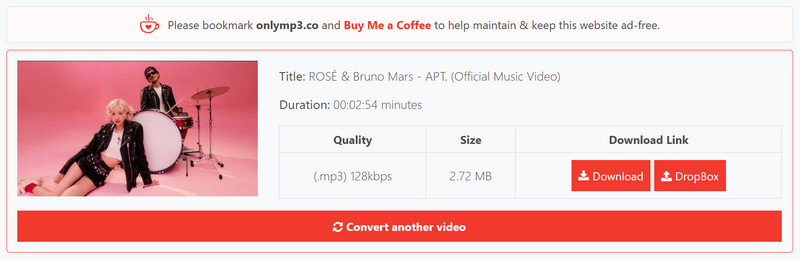
OnlyMP3 is a free online YouTube video to MP3 audio downloader. You can convert YouTube videos to MP3. The conversion process is entirely web-based; you don't need to create an account or download and install any programs to directly save your favorite music videos, tutorials, speeches, and interviews to Dropbox or your local device.
| Support URL |
Output Format |
File Save Path |
Output Kbps |
Sign Up or Not |
| YouTube only |
MP3 only |
Dropbox or Browser |
128 kbps |
❌ |
Step 1: Open the website directly.
Step 2: Copy the video link from YouTube and paste it into OnlyMP3 downloader.
Step 3: Click "Convert MP3" and then choose to save the video to Dropbox or download it directly to your browser.
Part 2: OnlyMP3 Real Test and Key Features
To confirm what OnlyMP3 can really do, we tested it with YouTube content of different lengths and types, including regular videos, long videos, shorts, playlists, DRM-protected videos, mobile browsers, and Firefox extensions, and examined the encoding, true bitrate, and metadata of the final MP3 files.
| YouTube Test |
Success |
Output |
Main Finding |
| 3-min public video |
✔ |
128 kbps MP3 · 2.83 MB |
Conversion successful |
| 30-min interview |
✔ |
128 kbps MP3 · 8.54 MB |
Conversion successful |
| 2-hour podcast |
✔ |
128 kbps MP3 · 121.59 MB |
Conversion successful |
| Nearly 6-hour video |
❌ (videos up to 4 hours) |
No output |
Videos longer than 4 hours are not supported |
| YouTube Shorts |
✔ |
128 kbps MP3 · 475.32 KB |
Conversion successful |
| Playlist |
❌ |
No batch output |
Not support parsing all content in the Playlist |
| DRM-protected videos |
❌ |
No output |
Unable to parse DRM-protected link |
All successfully converted files in our test were provided as 128 kbps MP3. OnlyMP3 did not offer a bitrate selector, and videos longer than 4 hours could not be converted.
1. Can You Use OnlyMP3 on iPhone or Android?
- OnlyMP3 is a web-based tool that can be used directly through iPhone, iPad, and Android mobile browsers without requiring desktop software installation. Actual performance may vary depending on the browser's download and file saving methods.
2. What URLs does OnlyMP3 Support for Online MP3 Conversion?
- It is primarily used for converting YouTube video links. According to our tests, it can handle regular public videos, short videos, and videos longer than 2 hours without issue, but it does not support videos longer than 4 hours, nor can it parse and download the entire playlist at once.
3. Does OnlyMP3 Support Formats Other than MP3?
- In the September 2026 test, OnlyMP3 only offers MP3 output and does not provide options for other formats such as MP4, AAC, FLAC, and WAV. If more formats are needed, other tools will be required.
4. Can You Customize the Bitrate or Audio Quality?
- OnlyMP3 downloads videos to MP3 128 kbps by default. It does not offer options for custom bitrate and audio quality.
Which One Supports Customization?
Any Video Converter offers customization options, allowing you to choose formats other than MP3, bitrates, sampling rates, or others. Please note that YouTube (regular video) typically has a maximum audio bitrate of 128 kbps, while YouTube Premium offers a maximum of 256 kbps. Therefore, if your source video is only 128 kbps, converting it to 320 kbps will not improve its audio quality. For better audio quality, upgrading to YouTube Premium is a better choice.
5. Why did My Download Fail?
- If OnlyMP3 fails to convert the video, first check if the video is longer than 4 hours, and whether the video is DRM protected or currently unavailable. In this test, OnlyMP3 was unable to parse the above three types of YouTube videos. If you fail to download a public YouTube video, try copying the full link again, refreshing the page, or re-downloading it later.
6. Does OnlyMP3 Show Pop-ups or Redirects?
- In this round of testing, OnlyMP3 will display a "Support OnlyMP3" pop-up within the site. This is not the same as a third-party ad redirect, but it will temporarily interrupt the download process.
Part 3: Do You Know the OnlyMP3 Extension?
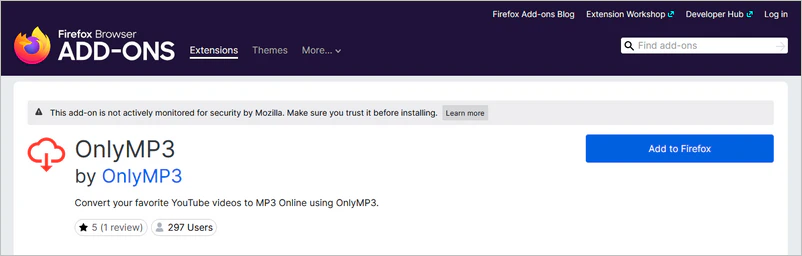
OnlyMP3 currently provides official extensions for both Firefox and Opera. In our test, the extension does not perform the conversion directly inside the browser; instead, it sends the selected YouTube video to the OnlyMP3 website for conversion.
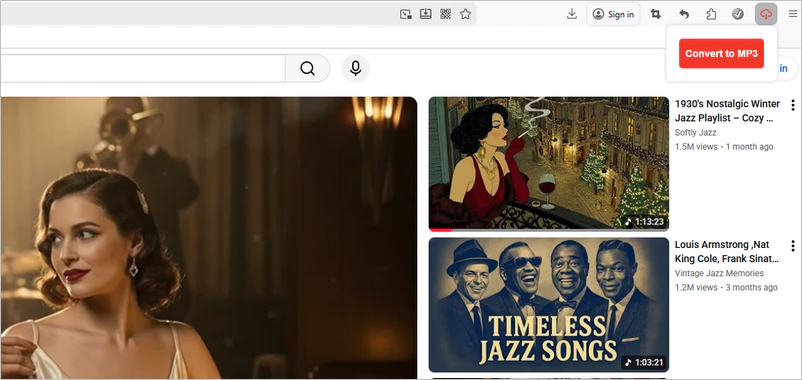
Install the OnlyMP3 extension in your Firefox browser, and you can start downloading YouTube to MP3 simply by opening the YouTube webpage and clicking the extension icon - no need to copy URLs to third-party websites. The process is faster than the OnlyMP3 online converter.
The OnlyMP3 Firefox extension does not perform the YouTube to MP3 conversion directly in the browser. Clicking the convert button in the extension opens the OnlyMP3 website and brings the current YouTube video link to the webpage to continue the conversion.
Step 1: Open the OnlyMP3 extension installation link in the Firefox browser.
Step 2: Click "Add to Firefox" and confirm to install in the browser.
Step 3: Open the YouTube webpage in your Firefox browser and locate the video you want to download.
Step 4: You do not need to log in to your YouTube account. Just open the extension in the upper right corner and click "Convert to MP3" to start the YouTube to MP3 conversion.
Is the OnlyMP3 Firefox Extension Safe?
In our tests, this extension reads the current YouTube page and redirects to the OnlyMP3 website, instead of performing the MP3 conversion on the YouTube page. You can review the current permissions and data disclosures on the Firefox or Opera add-on page before installing it.
YouTube Downloader Extensions That Still Work on Chrome, Firefox, and Edge >>
Part 4: More Popular OnlyMP3 Converter Alternatives
While OnlyMP3 Converter stands out among many online YouTube to MP3 converters, it inevitably has the following limitations:
- A "Support OnlyMP3" pop-up within the site
- No batch download, no customization options.
- Frequent domain name updates may cause you to miss the latest website information.
So, are there more perfect MP3 converters?
Any Video Converter - Safer OnlyMP3 Alternative
| Feature |
OnlyMP3 |
👍 Any Video Converter |
Why it matters |
| Installation |
No |
Yes |
Depending on temporary or long-term use |
| Batch tasks |
No |
Yes |
Multi-video workflow |
| Automatic playlist updates |
No |
Yes |
Improve download efficiency |
| Output formats |
MP3-only |
MP3, M4A, WAV, MP4, MKV, WebM, etc. |
Device playback compatibility |
| Bitrate controls |
No |
Yes |
Customizable file output |
| Ads/redirects |
"Support OnlyMP3" pop-up |
No browser ad redirects |
Safe and complete download experience |
| Metadata |
Yes |
Yes |
File library organization |
| Long-video support |
Up to 4 hours |
Unrestricted |
For podcast and lecture downloads |
Any Video Converter is not just a free YouTube to MP3 converter but also a multi-website downloader, media file editor, and intelligent AI generator.
Not limited to YouTube alone, it also supports downloading and converting 1000+ mainstream media platforms. Its built-in browser significantly improves download and conversion success rates to 99%. You can directly download videos as MP3 or easily switch downloaded content to other video/audio formats. Whether saving online course audio, creating podcast material, or making a personal music library, Any Video Converter provides a stable and efficient solution.
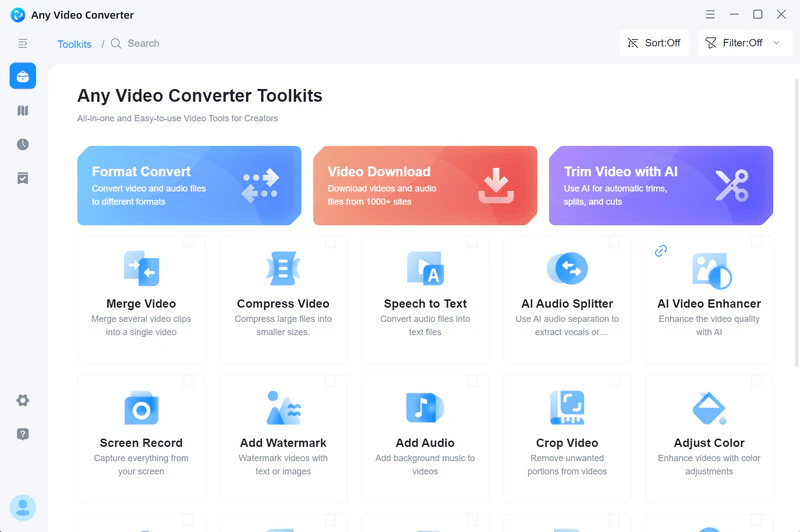
What Makes It Better than OnlyMP3 Downloader:
- Greater compatibility: Not just MP3, it supports several mainstream video formats (M4A, OGG, OPUS, FLAC, WAV, etc.).
- Controllable settings: You can customize and select advanced parameters as you like.
- Automatic video updates: The program will track and update new content without you having to paste links.
- Batch convert to MP3: Hundreds of videos in different formats can be added at once and converted to MP3.
- Save metadata: Fully preserve artist, album, and various video information.
- Preset feature: Once configured, the settings will be easy to use for the next conversion task.
How to Convert YouTube Videos to MP3 with Any Video Converter
For local videos, you can use the "Format Convert" tool to convert them to MP3 format. For online videos like those on YouTube, you can use the "Video Download". Here, we take converting online videos as an example.
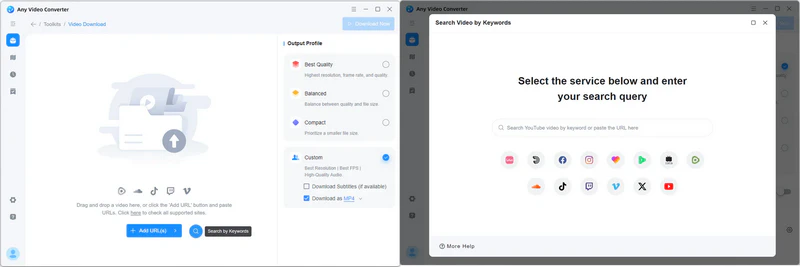
Step 1: Click the installer package below to start installing Any Video Converter. Then, launch it and click to enter "Video Download".
Step 2: Click the  to unlock the built-in YouTube browser (which can effectively improve the download success rate).
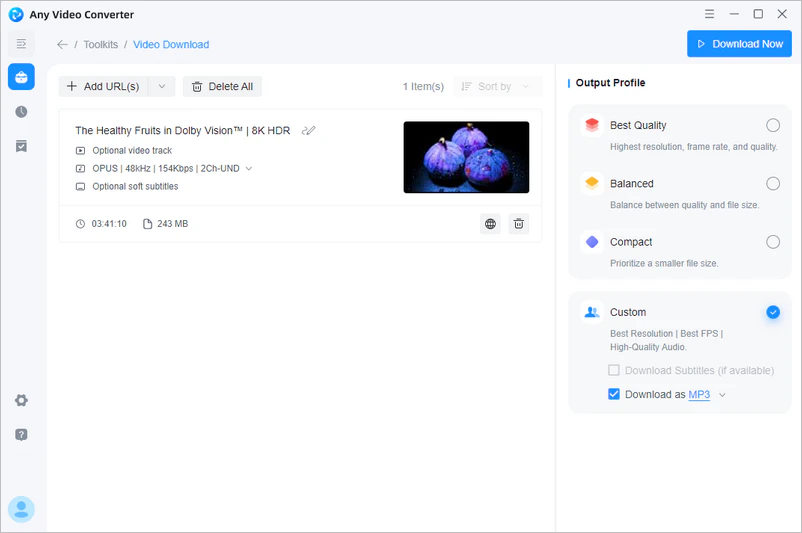
Step 3: Play the videos, playlists, and music you want to download to MP3. Then click "Parse Now". In the settings on the right, don't forget to enable the "Download as MP3" option.
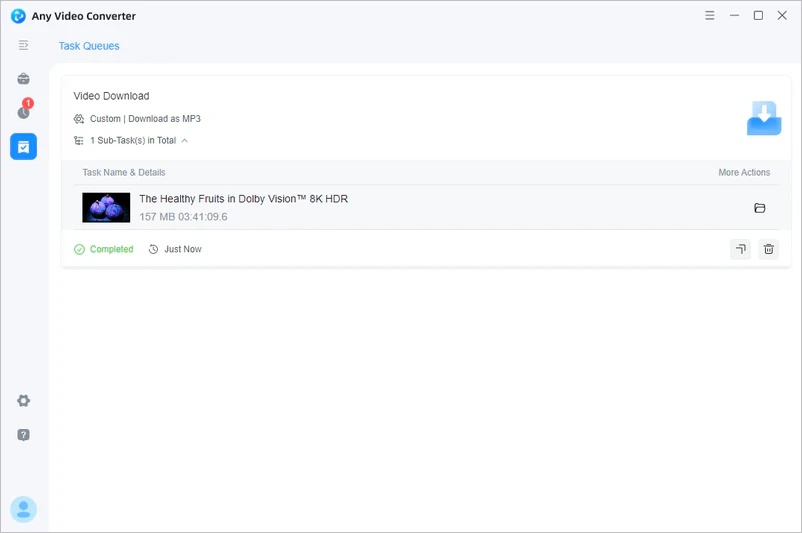
Step 4: Click "Download Now" to download videos as MP3.
Editor's Recommendation
If you often download music with OnlyMP3, you might also want to move your playlists across platforms. PlaylistGo lets you transfer playlists between Spotify, Apple Music, YouTube Music, and more. Keep all your favorite playlists organized and accessible anywhere now!
YouTube Multi Downloader - Online OnlyMP3 Alternative
| Feature |
OnlyMP3 |
YouTube Multi Downloader |
| Main use |
YouTube to MP3 |
Video/audio download |
| Output formats |
MP3-only |
MP4, WebM, MP3 |
| Bitrate tested |
128 kbps |
128 kbps |
| Playlist parsing |
No |
Yes |
| True batch download |
No |
No |
| Download workflow |
One video at a time |
Playlist can be parsed, but videos are downloaded one by one |
| Best for |
Simple MP3 conversion |
Users who also need MP4/WebM or playlist parsing |
YouTube Multi Downloader, just like it said, can save YouTube videos to your computer or mobile phone in MP4, MP3, and WEBM. Although YouTube Multi Downloader can parse a YouTube playlist and list its videos, it processes them sequentially during actual conversion. This means that it can receive your playlist links all at once, but the MP3 files are downloaded one by one, and the download will be interrupted if you close the webpage. Therefore, you must not close the website and must ensure a stable internet connection during the conversion process.
What Makes It Better than OnlyMP3 Downloader:
- Besides converting to MP3, it can also convert to the WEBM audio format.
- Supports YouTube playlist parsing for batch downloads.
- The conversion process has no ads or redirect pages, unlike OnlyMP3.
How to Convert YouTube Videos to MP3 with YouTube Multi Downloader
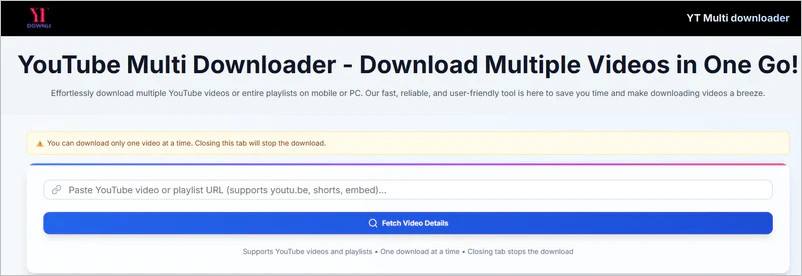
Step 1: Open the YouTube Multi Downloader website and the YouTube website.
Step 2: Copy the YouTube video link, then switch back to the YouTube Multi Downloader website and paste it in.
Step 3: Start fetching video details, then click "Load Options". Select MP3 format from the displayed options to download.
Part 5: FAQs about OnlyMP3
Is OnlyMP3 safe to use?
OnlyMP3 can convert YouTube videos to MP3, but it's not entirely risk-free. During testing, I encountered pop-ups within the site. While these weren't malicious third-party ads, I still recommend clicking only the main conversion and download buttons, avoiding clicking on irrelevant content.
Can I save OnlyMP3 downloads to Dropbox?
Yes. OnlyMP3 offers a "Save to Dropbox" option after conversion, allowing you to save the generated MP3 directly to Dropbox instead of downloading it to their local device.
How to avoid viruses from OnlyMP3 converter?
Do not click on suspicious ads, pop-ups, or new redirected pages, and do not enter your personal information. If it asks you to download unknown programs, install additional extensions, or enter your account password, it is recommended to close the website immediately. Keeping your browser and security software up-to-date also helps reduce risk.
Can I download a YouTube playlist to MP3?
OnlyMP3 does not support. Based on our testing, OnlyMP3 primarily handles single YouTube video links. The videos in the playlist need to have their links pasted one by one and converted to MP3. However, Any Video Converter can download YouTube playlists to MP3. Most importantly, it can track newly added content and add it to the download queue.
What should I use if OnlyMP3 cannot convert my video?
First, check if the video exceeds the 4-hour duration limit, or if it is unavailable, restricted, or unparseable content. If it is confirmed to be a regular public video but the conversion still fails, you can try downloading again later. If you are downloading long videos, playlists, batch tasks, or other output formats, you can use a more comprehensive desktop download and conversion tool like Any Video Converter.
Final Thoughts
In conclusion, OnlyMP3, as a free online YouTube to MP3 converter, can indeed meet basic audio extraction needs. It requires no registration and supports direct saving to Dropbox, making it a lightweight MP3 converter. However, we must also be aware of its limitations: an in-site support prompt, no batch download, and no customization options can all negatively impact your conversion experience.
In comparison, Any Video Converter offers a more stable, efficient, and secure MP3 conversion solution. Whether for learning, creative work, or personal entertainment, it provides long-lasting and high-quality service support. Of course, the final choice depends on your specific needs and requirements for security and functionality.

Besty Smith | Content Writer
Besty Smith is a talented and insightful content creator with a keen interest and passion for software programs. She focuses on in-depth research and hands-on experience with various types of software, providing readers with in-depth and inspiring content through precise writing. With her keen insight into the software industry, Besty is committed to helping readers keep abreast of the latest industry trends so that they can stay competitive in the digital age.