


[2026 Warning!] 5 Things You Must Know about YTMP3
When all you want is a clean MP3 file, you're forced to download a bunch of malware, with more pop-up ads than the file itself. The worst part is that once you finally get the MP3 file, the sound quality is terrible. It's unbelievable that this is still happening in 2026.
There are now many ad-free YouTube to MP3 converters like YTMP3 available online, which truly solve your problem of being bothered by ads. But do you know if YTMP3 is really safe? Which domain is the official one? Does it contain viruses? Will it block accounts? Now let's get straight to the point. If you're going to use it, there are 5 things you must know about the YTMP3 converter.
- • Part 1: Is YTMP3.cc Available in 2026
- • Part 2: Is YTMP3 Safe
- • Part 3: What Makes YTMP3 Better than Other YouTube to MP3 Online Converters
- • Part 4: How to Use the YTMP3 Add-On Safely
- • Part 5: How to Convert YouTube to MP3 (Besides YTMP3)
- 5.1. Powerful Conversion Software | Any Video Converter
- 5.2. Intuitive Online MP3 Converter | OnlyMP3
- 5.3. Multi-Platform Support | CnvMP3
- • Part 6: FAQs about YTMP3
Part 1: Is YTMP3.cc Available in 2026
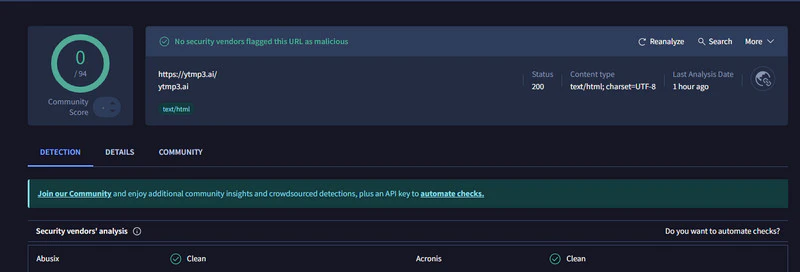
Typing "ytmp3.cc" in Google Chrome will redirect you to "https://ytmp3.ai/", which is normal because it changes the domain name. As of 2026, YTMP3 online converter remains a popular choice for users seeking YouTube audio, but the availability of its official domain has changed significantly. According to the latest data released by multiple security and evaluation organizations from the end of 2025 to the beginning of 2026, the following are YTMP3's most well-known and widely used main domains. No security vendors flagged these URLs as malicious:
How to convert YouTube to MP3 with YTMP3
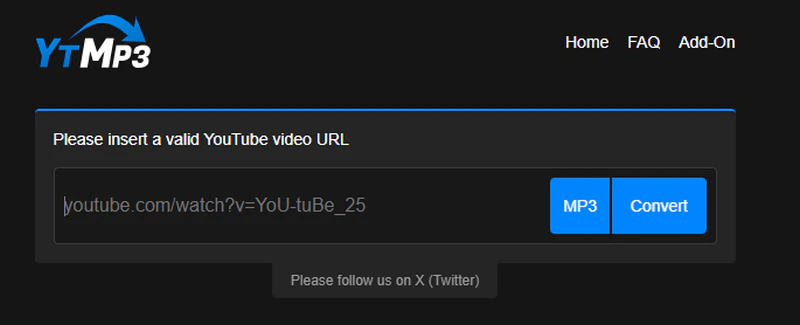
Step 1: Copy the video you want to convert from the YouTube website and paste it to any reliable YTMP3 domain above.
Step 2: The default output format for the YTMP3 website is usually MP3. You just need to click the "Convert" button next to the input box.
Step 3: The system will begin processing the video, which typically takes a few seconds to a minute to complete. Please do not close the webpage during this time.
Part 2: Is YTMP3 Safe
Based on the above tests, YTMP3 is a safe online converter as long as you use the official link accurately. However, according to security scan data, the following domains are not official YTMP3 websites, and there are security vendors that have flagged this URL as malicious.
🚨 Please avoid using them:
- ytmp3.plus
- arcaneink.pl
- ytmp3free.cc
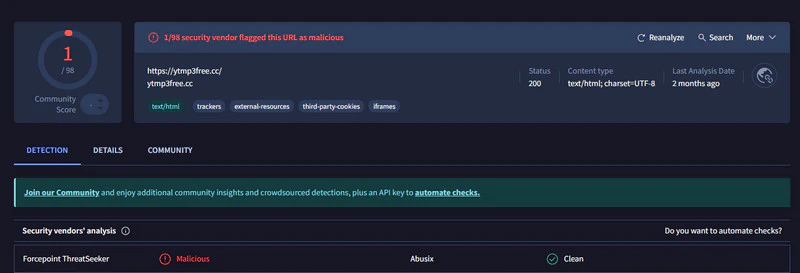
Our security scan data is based on
It's important to note that if you live in a region with strict copyright regulations, directly accessing any of the above domains may result in a blocking message. In this case, it's not a matter of fake domains, but rather a blocking by your internet service provider.
Method 1: Pay attention to excessive advertising
Legitimate YTMP3 websites usually have ads, but they won't fill the entire site. If you open one YTMP3 domain and your screen is filled with pop-ups before you've even done anything, then it is likely not trustworthy.
Method 2: Check for buttons that try to trick you into downloading bundled software
This is a common trap used by many fake YTMP3 websites. When you click the "Download converted file" button, you think you're saving the audio, but what you actually download is a completely unrelated software installation package.
So you better carefully check the format of the downloaded file. If you're converting to MP3, the downloaded file should theoretically be in ".mp3" format. If your browser prompts you to download an ".exe", ".zip" file, or even one with words like "setup," "install," or "downloader" in the filename, then it's not an audio file but rather a bundled program.
Method 3: Don't click around on the webpage
For any YTMP3 URLs or other online converter pages, never click around on random pages; simply enter the link and click download. Close any irrelevant pages that pop up immediately.
 How to safely download YouTube to MP3 >>
Part 3: What Makes YTMP3 Better than Other Online MP3 Converters
- Fewer ads make your conversion process cleaner
- Fewer restrictions, freely convert YouTube videos
- Fast conversion speed and high success rate
- A browser plugin for easier conversion
1. Fewer ads make your conversion process cleaner
Many similar converters are plagued by numerous pop-up ads and fake download buttons, severely impacting the conversion experience. In contrast, the YTMP3 official website has significantly fewer ads, and its interface is clean and clear, allowing you to focus on the conversion process without frequently closing pop-up ads.
2. Fewer restrictions, freely convert YouTube videos
Using the YTMP3 converter does not require logging into an account, and there is no daily limit on the number of conversions. The only limitation is that the video length cannot exceed 240 minutes, which is much better than other free online YouTube converters.
3. Fast conversion speed and high success rate
YTMP3 can quickly parse YouTube videos and convert their formats, typically completing the conversion of a song in a few seconds to a few minutes.
4. A browser plugin for easier conversion
YTMP3 also offers plugins for Edge, Firefox and Opera. After installation, you can directly convert YouTube videos with a single click using the plugin, without having to copy the link and open a conversion page. See the next section for details.
Part 4: How to Use the YTMP3 Add-On Safely
The first step to using YTMP3 extensions safely is to ensure they come from a legitimate source. YTMP3 does not have a Google Chrome extension; if you encounter any advertising about this, do not believe it. Below are the official extension installation links.
- Edge/Firefox Extension: https://ytmp3.ai/add-on/
- Opera Extension: https://addons.opera.com/zh-cn/extensions/details/youtube-converter-2/
Under normal circumstances, the official YTMP3 extension only requires you to grant access to the YouTube website and download permissions. You'd better use a robust ad-blocker, as this can effectively block most hidden dangers. Here we take the YTMP3 Firefox extension as an example.
Step 1: Copy the extension to the Firefox browser and open it to install the extension.
Step 2: Open the YouTube website in the Firefox browser and play the video you want to convert. Click the extension icon in your browser toolbar and select the YTMP3 icon. In the pop-up menu, click the "Convert to MP3" button.
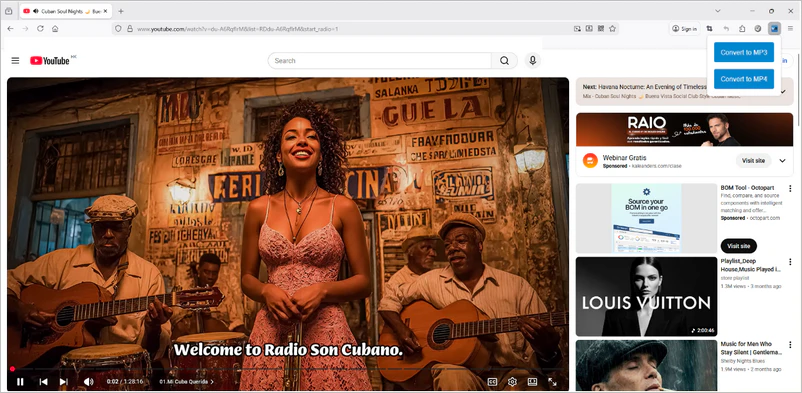
Step 3: This extension does not start downloading the file directly; instead, it will open a new tab and converts the YouTube video to MP3.
- "Read and change all your data on websites you visit";
- "Read your browsing history"
If the extension requests the following permissions, it is recommended to cancel the installation:
Quickly check if the extensions you installed have the above permissions enabled. If so, it is recommended to disable these permissions. Any permission requests that exceed the requirements of the conversion may be malicious.
Part 5: How to Convert YouTube to MP3 (Besides YTMP3)
5.1. Powerful Conversion Software | Any Video Converter
For those who prioritize high-quality audio, need batch processing, or wish to convert very long videos, Any Video Converter is a more reliable option than YTMP3 online converter. It not only supports converting local videos to MP3 but also features a powerful built-in MP3 downloader.
With 23 years of development experience, Any Video Converter is a highly regarded free conversion software. It received a very high score of 4.8 on Trustpilot, and users rave about it.
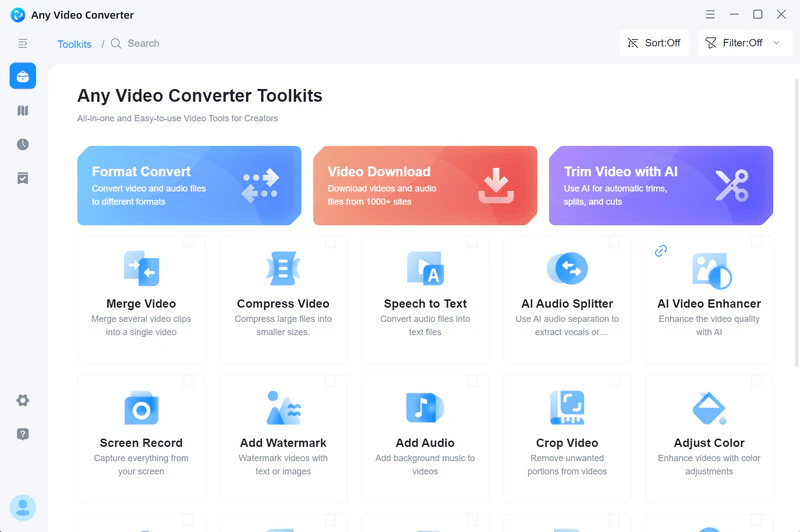
- It can convert local files to MP3 offline without requiring a network connection.
- Freely convert YouTube to MP3, OGG, WAV, AAC, FLAC, and over 1000 other formats.
- Add multiple YouTube URLs or files at once to batch download and convert them to MP3.
- Customize the bitrate, sample rate, and other parameters to find the balance between file size and sound quality.
- All MP3 downloads and conversions are completed on the local device without carrying any viruses.

How to Convert YouTube Videos to MP3 with Any Video Converter
This tutorial teaches how to convert YouTube video links to MP3, which requires an internet connection. If you want to convert local files to MP3 without an internet connection, click here.
Step 1: Launch Any Video Converter and select the "Video Download" tool.
Step 2: Copy the video URLs from the top of the YouTube website and paste them into the program. Then click "Parse Now" to start parsing the YouTube videos. Be sure to select "Donwload as MP3" in the "Custom" section.
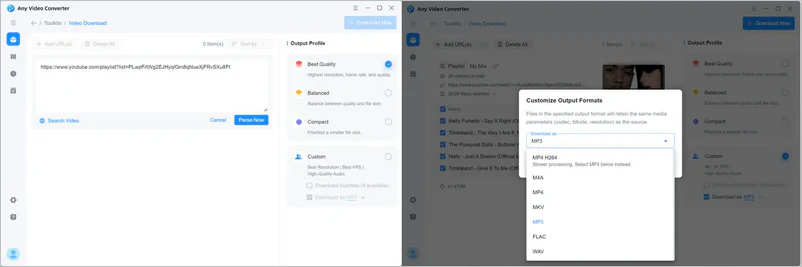
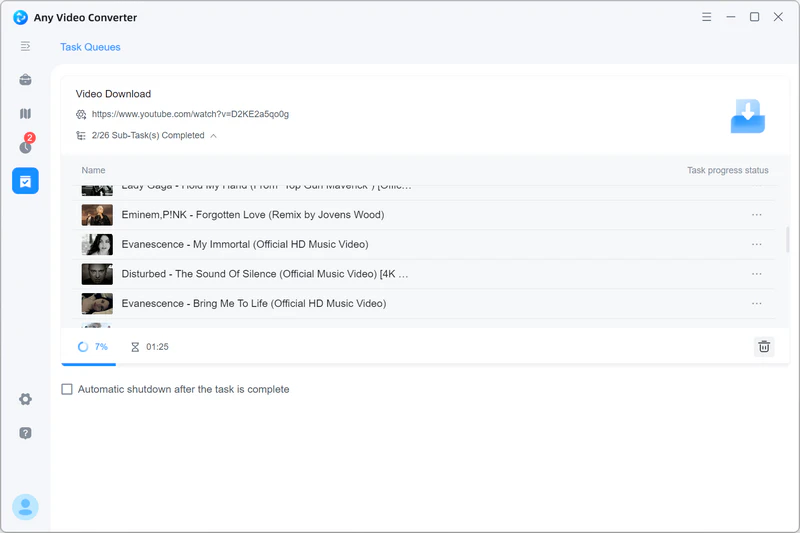
Step 3:Click the "Download Now" button, and it will start downloading the video and automatically extract the audio as MP3 format.
5.2. Intuitive Online MP3 Converter | OnlyMP3
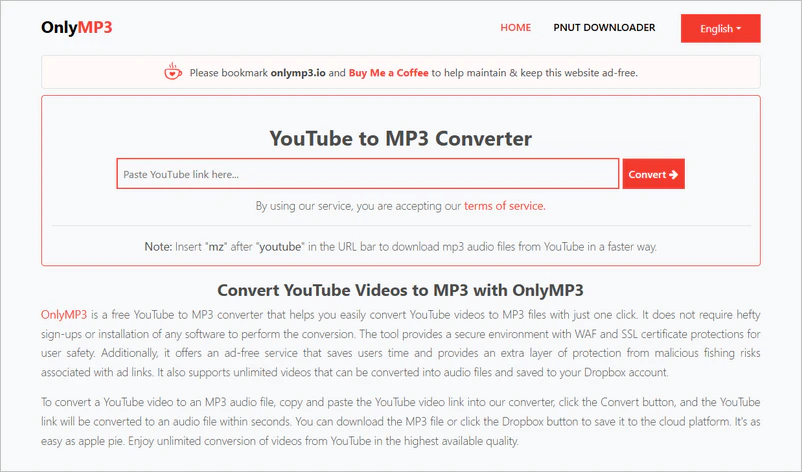
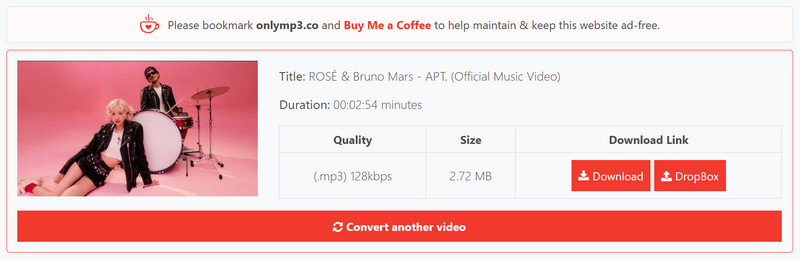
Onlymp3 can download and convert YouTube videos up to 6 hours long, while YTMP3 can only handle videos up to 4 hours long. Clearly, Onlymp3 has fewer limitations than YTMP3. Furthermore, anyone who has used Onlymp3 will notice that its website has fewer ads than YTMP3's and provides download parameters for viewing. Although it doesn't support adjusting parameters, the provided MP3 parameters indicate that it defaults to downloading the original YouTube video at the original bitrate, without compression.
How to Convert YouTube Videos to MP3 with OnlyMP3
Step 1: Find the video you want to convert on YouTube and copy the full link from your browser's address bar.
Step 2: Open the Onlymp3 website and paste the link into the search box on the homepage.
Step 3: Click "Convert", and the website will immediately begin parsing the video and redirect you to the download page. Click the "Download" button to save the MP3 file to your computer or mobile phone.
5.3. Multi-Platform Support | CnvMP3
CnvMP3 is another popular online MP3 converter that supports not only YouTube but also TikTok, Instagram Reels, Facebook, Twitch, and other mainstream social media platforms, making it ideal for those who need to obtain audio from multiple sources. Among many online MP3 converters, it's also one of the few that offers bitrate options and virtually no duration limits.
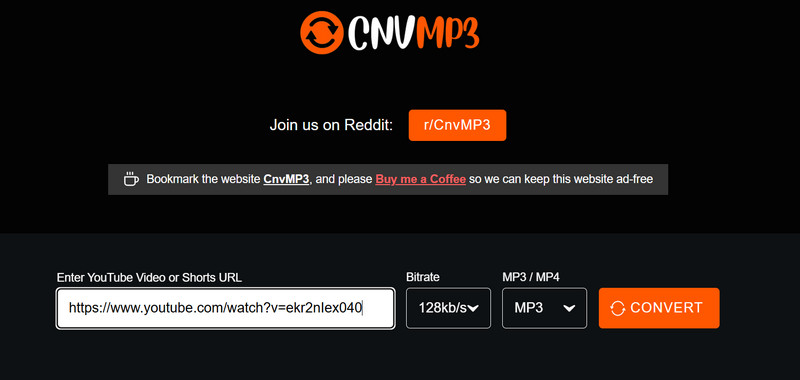
The official website for CnvMP3 is: https://cnvmp3.com/v51. Other unofficial websites (cnvmp3.org) are riddled with redirect pages. Remember not to open unofficial websites; only official websites can provide a safer conversion process.
How to Convert YouTube Videos to MP3 with CnvMP3
Step 1: Visit the Cnvmp3 website and paste the video URL you copied (YouTube or other supported platforms).
Step 2: After confirming the bitrate, click the "Convert" button. Each click may open a redirect page; simply close those irrelevant pages.
Step 3: Click the "Download MP3" button to save the file.
Part 6: FAQs about YTMP3
Q1: Does the downloaded MP3 have a 320 kbps audio quality?
No. YouTube does not offer 320 kbps audio, so it's impossible to get audio quality with 320 kbps. If you're looking for higher sound quality, we recommend using professional audio software like Spotify or upgrading to YouTube Premium.
Q2: Can I customize the bitrate in YTMP3?
No. The YTMP3 official website does not support manual bitrate selection. Its default download bitrate is 128 kbps. If you need to customize the bitrate, you can try using desktop software like Any Video Converter.
Q3: Will using YTMP3 converter affect my YouTube account?
No. When using YTMP3 to convert YouTube to MP3, you don't need to log in to your YouTube account. Therefore, it won't affect your YouTube account's viewing history, subscriptions, or recommended content. However, please be careful not to download copyrighted content to avoid violating platform policies.
Q4: Why does the YTMP3 website domain change so frequently?
This is because YouTube is constantly strengthening its monitoring mechanisms, so online converters like YTMP3 are frequently blocked. Therefore, they need to frequently change their domain names to maintain service availability. We recommend that you follow their official social media accounts to get the latest available domain names and avoid falling into phishing or cloned websites.
Q5: Will YTMP3 give me a virus?
The official YTMP3 website does not actively spread viruses, but some fake websites or pop-up ads may contain malware. This article provides 4 reliable YTMP3 websites for your selection. For all online websites, remember not to click on suspicious ads or download unknown plugins.
Q6: Why is YTMP3 not available in my country?
This may be because local internet regulators have blocked it. Some countries always ban or restrict YouTube video downloaders to protect copyrighted content. You can try using a VPN or proxy server, but please be sure to comply with local laws and regulations.
Final Thoughts
YTMP3, as an online YouTube to MP3 converter, remains a top choice for many users in 2026. As long as you use the official domain and follow the safety tips mentioned in this article, you can totally enjoy a clean and efficient conversion experience.
However, we must also admit that YTMP3 consistently falls short of Any Video Converter in terms of security and feature richness, as it not only overcomes file size and duration limitations but also supports batch conversion and GPU acceleration. As mentioned in the article, Any Video Converter, which has 23 years of development experience, received a high score of 4.8 on Trustpilot and has an excellent reputation among users. Choosing it is the only way to truly have no worries.


Besty Smith | Content Writer
Besty Smith is a talented and insightful content creator with a keen interest and passion for software programs. She focuses on in-depth research and hands-on experience with various types of software, providing readers with in-depth and inspiring content through precise writing. With her keen insight into the software industry, Besty is committed to helping readers keep abreast of the latest industry trends so that they can stay competitive in the digital age.